



Services

Animated video production

Startfire has been providing custom animated video production services for over a decade to clients in every industry you can imagine. Whether you’re looking to produce a 2D animation, 3D animation, explainer video, whiteboard animation, motion graphic, TV Ad or social media content, our production team can help you create the content you envision. Take a look at our animated video production services and get in touch with our production team to get the ball rolling on your animated video project.

Animated Video Production Service

Video Igniter’s Animated Video Production Services

2D Animation – Whether you need a modern looking computer animation or classic frame-by-frame hand-drawn animation, our animation team has the expertise to create any 2D animation you envision.

2D Illustrations – Our skilled illustrators can create custom 2D graphics tailored to your specific style and requirements, bringing a unique aesthetic to your project.

3D Modeling – From showcasing the inner workings of a complex device to creating engaging 3D characters, our team can assist in the creation and animation of 3D models to enhance your visual storytelling.

3D Animation – Add depth and realism to your video with our 3D animation services. Our 3D animators are proficient in creating everything from animated cartoons to 3D animated CAD models.

Whiteboard Animation – Looking for a simple, low cost way to explain new information to your audience? Whiteboard animations are a simple straightforward way to create educational videos that keep viewers engaged.

Script Writing – Let Video Igniter’s top-tier scriptwriters craft compelling narratives for your brand. We have a track record of creating remarkable scripts for globally renowned brands and innovative startups. If you prefer a hands-on approach, download our free scriptwriting template to help you write your script and save money on your production budget.

Storyboard Creation – Our team can create a detailed storyboard for your animated video to help guide the illustrators and animators that create your video. To take a more direct role and save on your production budget, use our free storyboard template to create your storyboard yourself.

VoiceOver – Benefit from our extensive network of professional voiceover artists, capable of delivering in a wide range of tones, ages, and languages. If you prefer a DIY approach, watch our video guide on how to record high-quality voiceovers at home, free of charge.

Soundtrack Licensing – Elevate your video with a fitting soundtrack. We ensure you have legal rights to use any soundtrack in your animated video, keeping your content compliant and worry-free.

Soundtrack Production – If originality is key, our talented composers are ready to create a unique soundtrack that complements your video perfectly.

Video Translation – Reach a global audience by translating your videos into multiple languages. This service can help you expand your reach and connect with viewers from different cultures and linguistic backgrounds.

Animated Video Production Examples

Video Igniter can create any kind of 2D or 3D animated video for you. Check out our animation portfolio here. Request access to our demo reels and price sheet here.

Contact us or to start making your video.

Check out our animated video portfolio to see our latest and greatest creations!

Animated Video Production Service Portfolio

Other Types of Animated Video Production Services We Offer

Custom Animated Video Production – Get a unique and captivating animated video tailored to your brand and message.

White Label Animated Video Production – Outsource your animated video production to our trusted white-label animation studio.

Explainer Videos – Engage your audience with concise and compelling animated explanations of your products or services.

Animated Videos For Trade Shows – Attract attention and leave a lasting impression with eye-catching animated videos for your trade show booth.

Animated Blockchain Explainer Videos – Simplify complex blockchain concepts through engaging and informative animated videos.

Kinetic Typography Animation – Keep your audience focused on your message with animated words synchronized with a voiceover.

Animated Videos For Case Studies – Transform boring white papers and PDF case studies into dynamic and easily understandable animated videos.

Animated Product Video – Showcase your product’s features and increase sales with a captivating custom animated product video.

App Explainer Video – Highlight your app’s functionalities and captivate potential users with an animated app explainer video.

Animated GIF Creation – Make your content stand out with animated GIFs that convey more than static images.

Animation Outsourcing – Outsource your animated video projects to the professionals at Video Igniter so that you can focus on what you do best to grow your business.

Animated Promotional Video – Increase awareness and reach a wider audience with attention-grabbing animated promotional videos.

Animated Infographic Videos – Present complex information in a visually appealing and memorable way with animated infographic videos.

Short Animated Videos – Deliver a powerful message in a short span of time with engaging and concise animations.

Animated Sales Video – Boost your sales efforts with a custom animated video that showcases your products or services.

Animated Logos – Give your logo a dynamic touch with animation, adding personality and visual appeal.

Add Animation To Video – Create and add some animated clips to your video project.

Startup Explainer Video – Communicate your startup’s value proposition clearly and attractively with an animated explainer video.

Animated Political Video Ads – Educate voters and promote political messages effectively using animated video ads.

Animated Lyric Videos – Combine music and animation to create captivating lyric videos that entertain and engage your audience.

Cheap Explainer Videos – Get cost-effective explainer videos without compromising on quality, perfect for budget-conscious projects.

Animated Video For Marketing – Stand out in the market with high-quality custom animated videos that captivate your target audience.

Animated Customer Support Videos – Improve customer support and reduce costs by providing animated videos that address common queries.

B2B Explainer Videos – Simplify your business offerings and attract B2B clients with compelling animated explainer videos.

Animated Educational Videos – Enhance learning and retention with engaging animated videos that simplify complex information.

Animated Advertisement Video – Drive awareness and sales with animated video ads that can be optimized for maximum impact.

30 Second Animated Videos – Deliver quick and impactful messages with concise 30-second animated videos for ads and educational content.

Animated Crypto Explainer Video – Educate audiences about cryptocurrencies using visually appealing and informative animated videos.

Animated NFT Production – Transform your creative ideas into animated NFTs by leveraging our expertise in animation and blockchain technology.

Adding Animation To A Video – Enhance your live-action videos by incorporating animated clips that grab attention and add visual interest.

Animated Videos For Weddings – Create personalized and eco-friendly animated wedding invitations that become cherished mementos of your special day.

Animated Video Series Production – Create a series of custom animated content efficiently and cost-effectively with our expert team and streamlined production process.

Motion Graphics Animation – Enhance your videos with visually stunning animated motion graphics created by our skilled team.

Animated Cartoon Video – Bring your stories to life with customized animated cartoon videos.

Animated Video Marketing and Promotional Services

Animated Video Marketing and Promotional Services

Video Promotion – Amplify the visibility of your video ads across all platforms and devices, optimizing conversion rates and maximizing your budget.

Generate Leads From Your Animated Videos – Capture valuable email addresses from viewers of your videos, turning them into potential leads for your business.

Improve Your Video Conversion Rate – Boost the effectiveness of your marketing videos by implementing strategies that drive higher conversion rates over time. Let us optimize your videos for better results.

Animated Video Syndication – Maximize your video’s reach by leveraging our expertise in distributing animated videos across platforms to target your specific audience.

Industry Specific Animated Video Production Services

Industry Specific Animated Video Production Services

Animated Corporate Videos – Present your business and values in an engaging and visually stunning way with a captivating animated corporate video.

Animated Video For Your Business – Elevate your brand with a custom animated video tailored to your business. Explore our Animated Video For Business FAQ and browse our impressive animated video portfolio.

Medical Animations – Simplify complex medical concepts and procedures with our expertly crafted 2D and 3D animated videos, helping healthcare professionals and patients understand critical information.

White Label Animated Video Production for Agencies – Streamline your agency’s workflow by outsourcing animated video production to our white-label service, delivering high-quality content for your clients without the hassle.

White Label Production For E-Learning Companies – Scale up your animated educational content production with our white-label services designed specifically for e-learning companies. Expand your capabilities and meet the growing demand for custom animated videos.

Animated Investor Pitch Decks – Capture investors’ attention with a concise and visually appealing animated version of your pitch deck, highlighting key points and making a memorable impression.

Still have questions about animated video production services?

Do you have a question about animated video production services that wasn’t addressed in this FAQ? Use this form to send us your question and we’ll follow up with an answer. We’ll also post the question and answer to this page so other people can benefit from the knowledge.

Still have questions?

What is Video Igniter Animation?

Video Igniter Animation is an online animated video production service. By working with our team online, you can get your custom animated video produced faster and for less than hiring a brick and mortar animation studio.

We can help you create any kind of 2D animated video or 3D animation you can imagine. Check out our animated video portfolio.

If you’re looking for an explainer video company to make an explainer video, we make those too!

Need help syndicating your animated video? Ask us about video promotion!

Watch our explainer video on our home page to learn more about how we can help you create an animated video. For examples of the kinds of animation our team can produce, check out the demo reel below:


Looking For An Animated Video Company In The U.S.?

Video Igniter is headquartered in Seattle, Washington.

Animated Video Production Success Stories & Testimonials

Don’t just take our word for it – these testimonials highlight Video Igniter’s reliability, creativity, flexibility and ability to deliver animations that exceed expectations. When you choose Video Igniter Animation, you can rest assured that you are working with a trusted and reputable studio.

“Video Igniter were very easy to work with and the entire process for creating and suggesting edits was seamless and stress-free. I would work with them again and would recommend to others looking to create a modern and stylish explainer video.”

Clair Simpson – VP Marketing, Repool.com

“I run a video production company and outsource animation. The team at Video Igniter did a great job in taking the concept I very crudely drew out and making it into a beautiful animation. The review process was easy and their turnaround time was very quick. I’d def recommend them if you’re looking for an animation project.”

Pat Henderson – Founder, Path8 Productions

“Video Igniter offered us the critical combination of creative value, clear communication, and patience with stakeholder feedback. We ended up with truly high-quality design assets for our video series largely due to the extra level of commitment — and the right balance of efficiencies with flexibility in the process when called for.”

Larry Schlessinger – Sr. Creative Program Manager, Amazon Web Services

“Video Igniter came to us with a number of creative and engaging ideas and were able to create an exciting, impactful video in a short period of time. And the best part was that it cost much less than other options of similar quality. The video they made is a great marketing tool for us.”

In this tutorial I will show you how the graphic designs of a video game is made, from research to finalization of the game, and marketing. I will explain my thinking process and decision making.

First of all, creating a video game is a team work, as a graphic designer you have to keep in mind the needs of game designers to make their gameplay ideas look good, and clear (example: platforms, enemies …).

For a VR game like this one, you must also know the technical constraints related to this support ( number of polygon and particles, lighting).

I will also give you some tips and tricks that you can use when working on your own piece. I will cover aspects like concept, modelling, lighting and marketing. I hope you will find it useful and interesting.

Concept

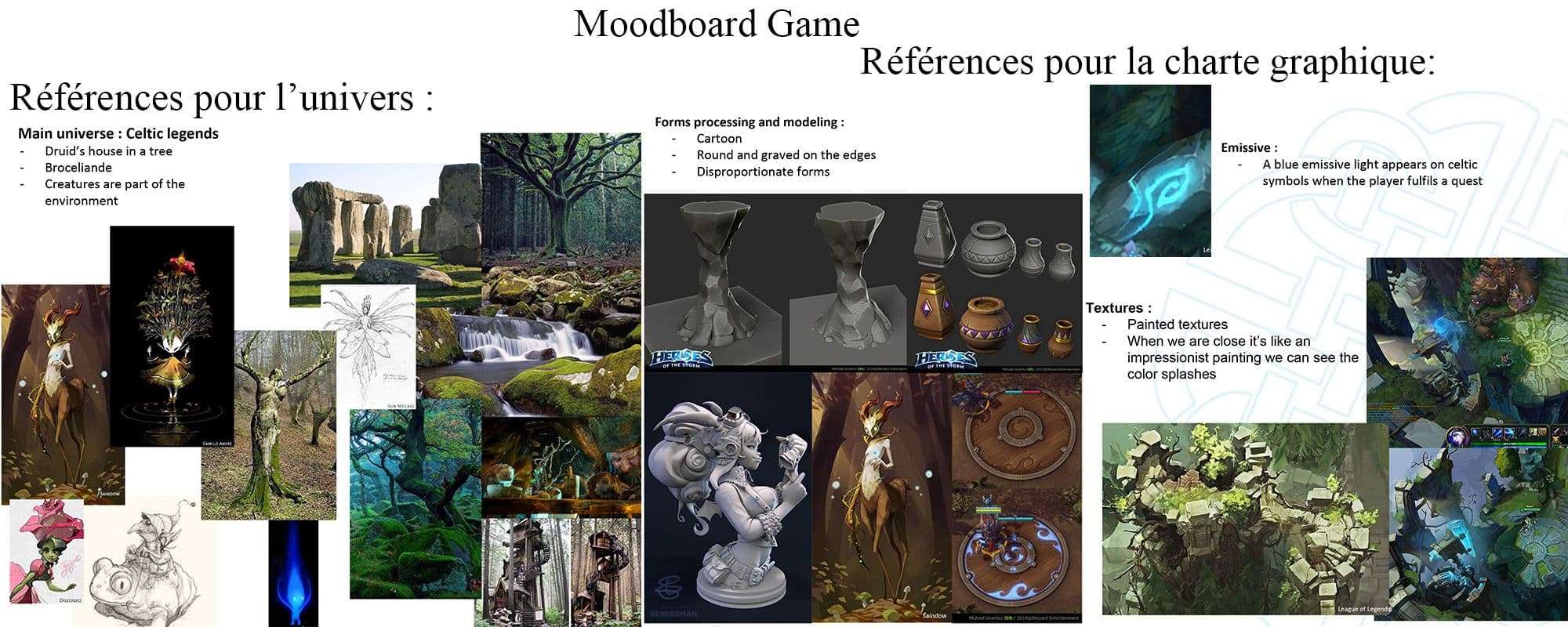
I start by making research on the universe/theme that we chose for the game. Here for the hut of an old druid, so a Celtic, and medieval fantasy atmosphere. I wanted to add an original and colourful floral touch to add an aspect of total symbiosis between the druid, and the nature but while remaining coherent. I took Japan, and its gardens as a reference.

We then chose the graphic charter. I am always inspired by video games, artists and films whose aesthetics I appreciate. For the forms I take as reference the game “Heroes of the Storm”, to have shapes that make the place welcoming. For this project I want to have an aspect of painting as in the game “League of Legends”, I also chose the colourful range of this game that match the atmosphere we are looking for, welcoming but mysterious.
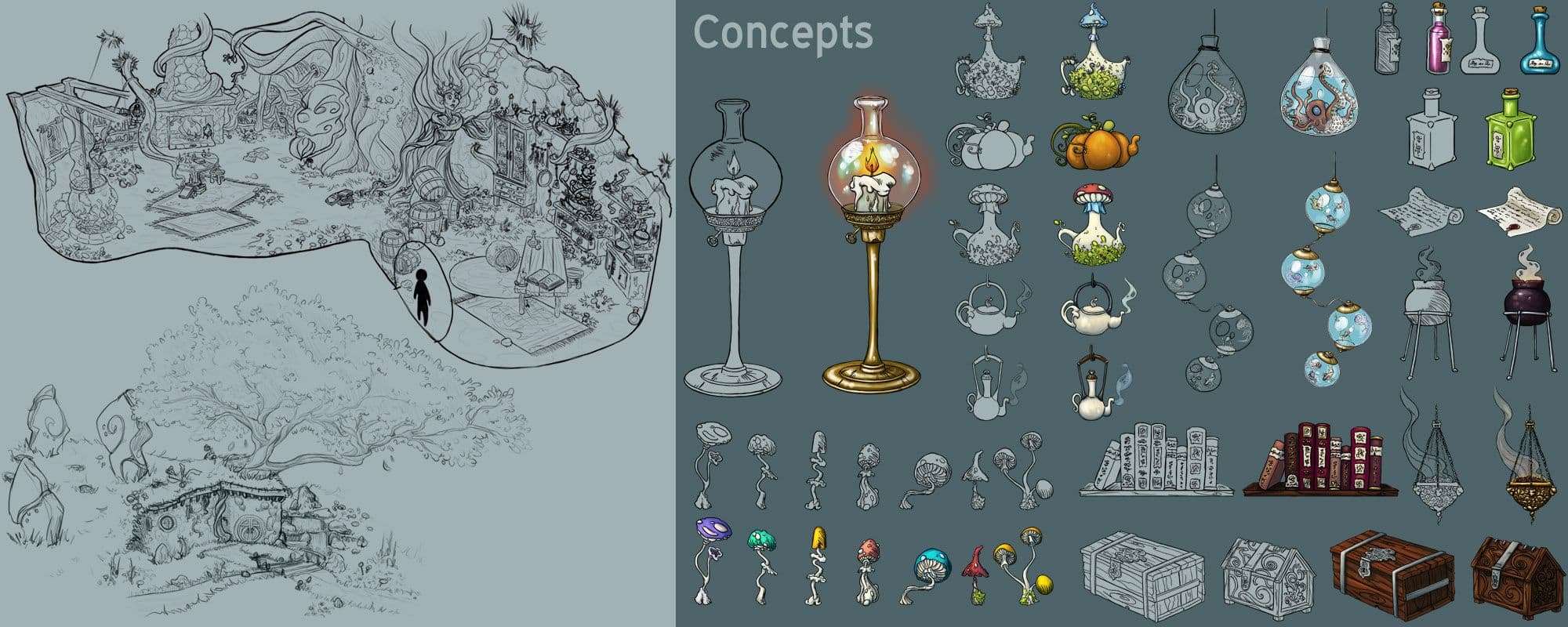
Once I have this base, I do the concepts arts, research ambience, environment and props.
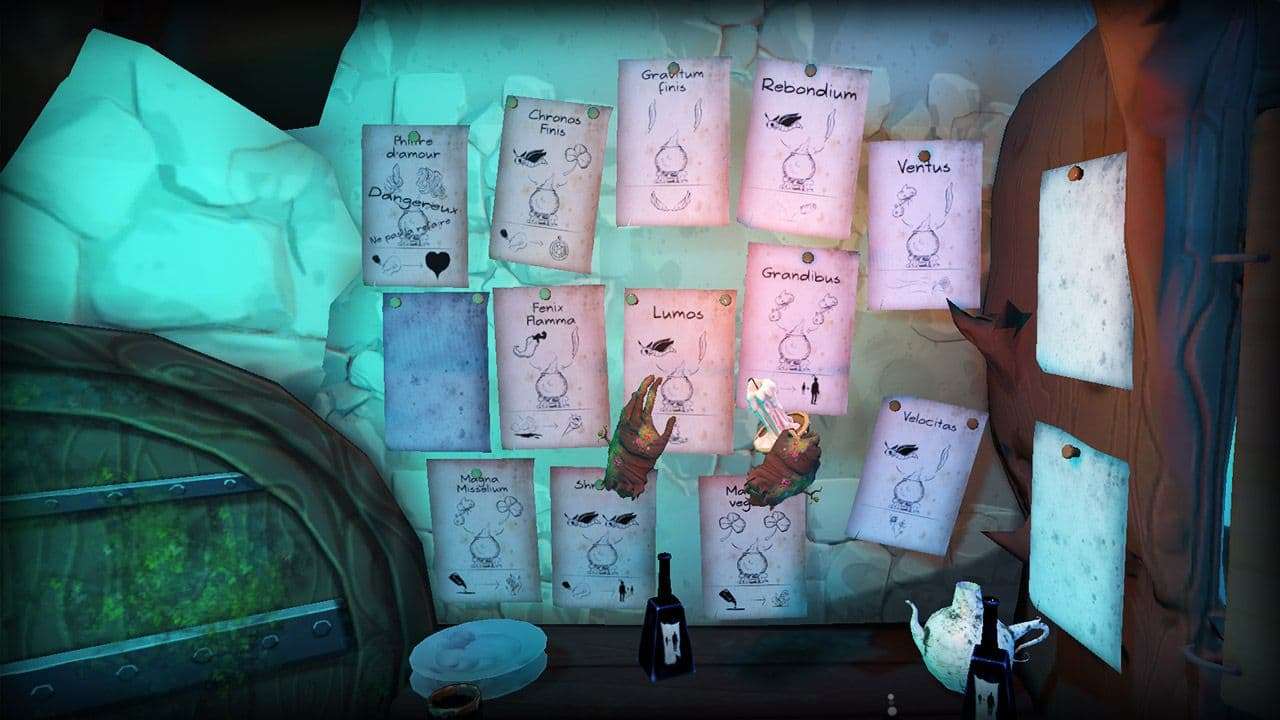
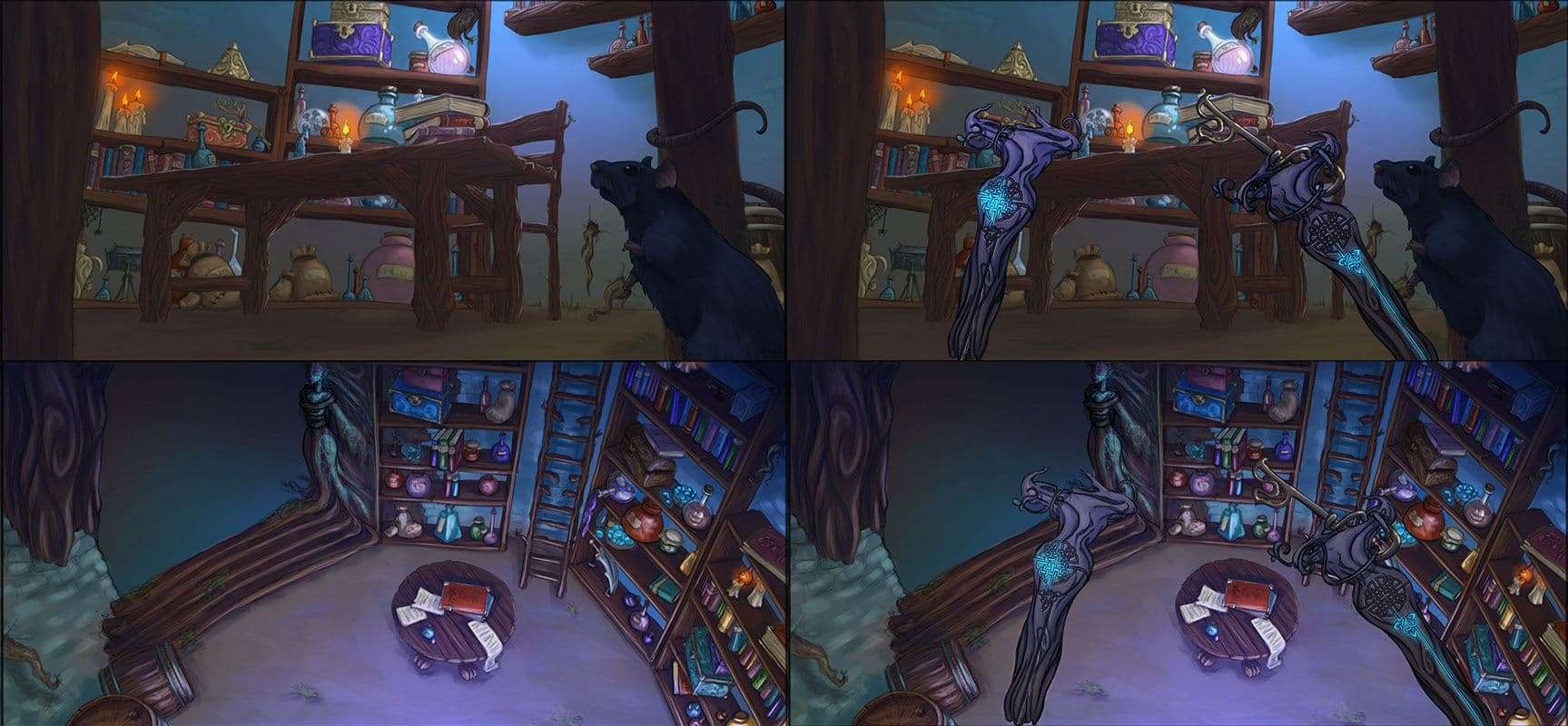
I also realize fake Screens. For this game it’s necessary to show 2 aspects of the game, the player when he is very small, and when he is very big because he can change size to pass in certain places or to find certain ingredients.
During the creation of a game of new ideas appears, and others  
disappear. Do not hesitate to make new concepts fast especially for props and organize well for timing. Time is very important to make a game, we never have enough! We must adapt, and always seek the fastest method to work.

Modelling

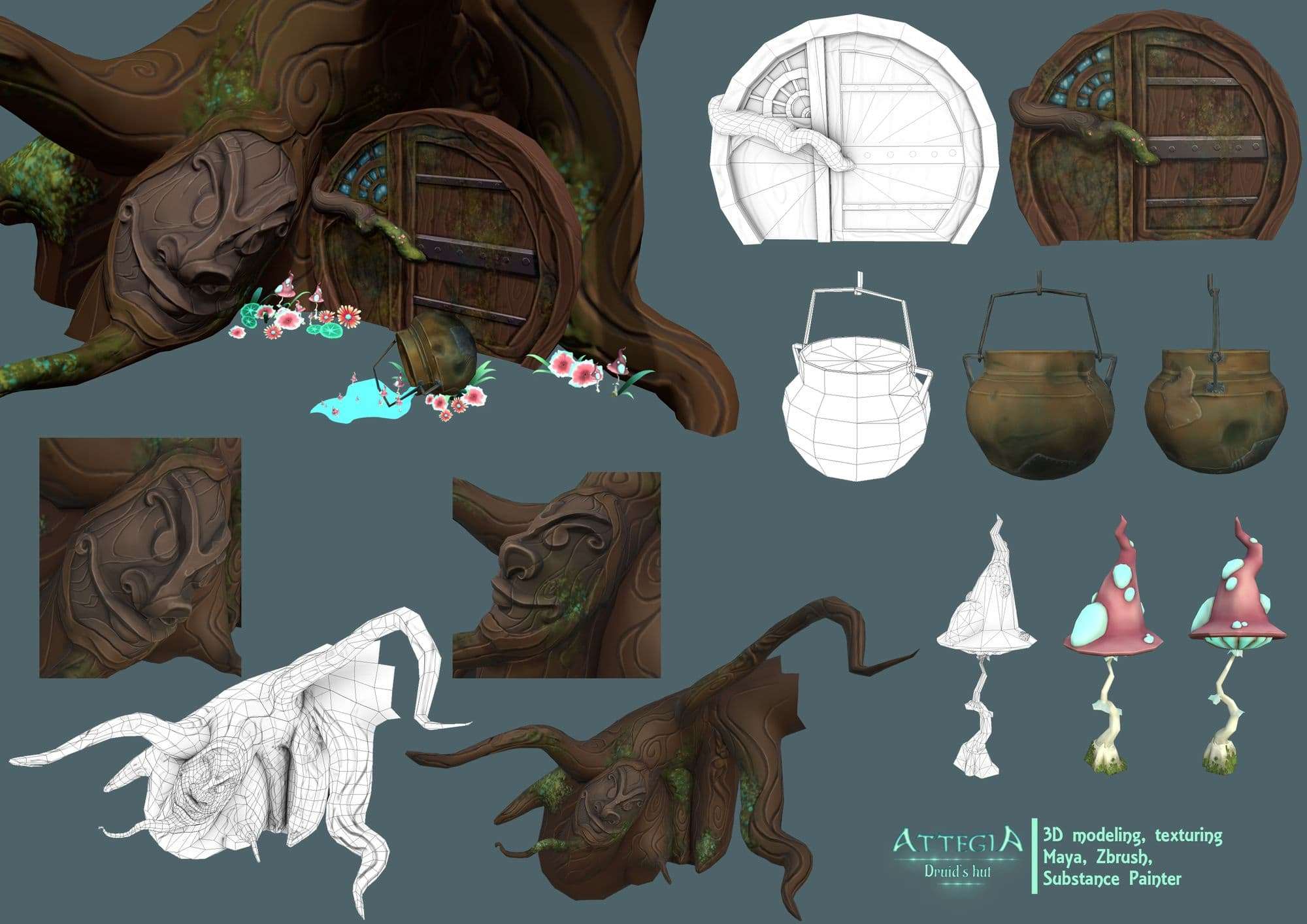
I  work on Maya and ZBrush to model and animate. We were 3 game artists on the project which allowed to divide the work of modelling and allowed us to create more things in less time. For the creatures that populate the hut I create a high poly model on ZBrush, then I make the retopo in Maya. For this step it’s always necessary to keep in mind that the character is going to be animated.
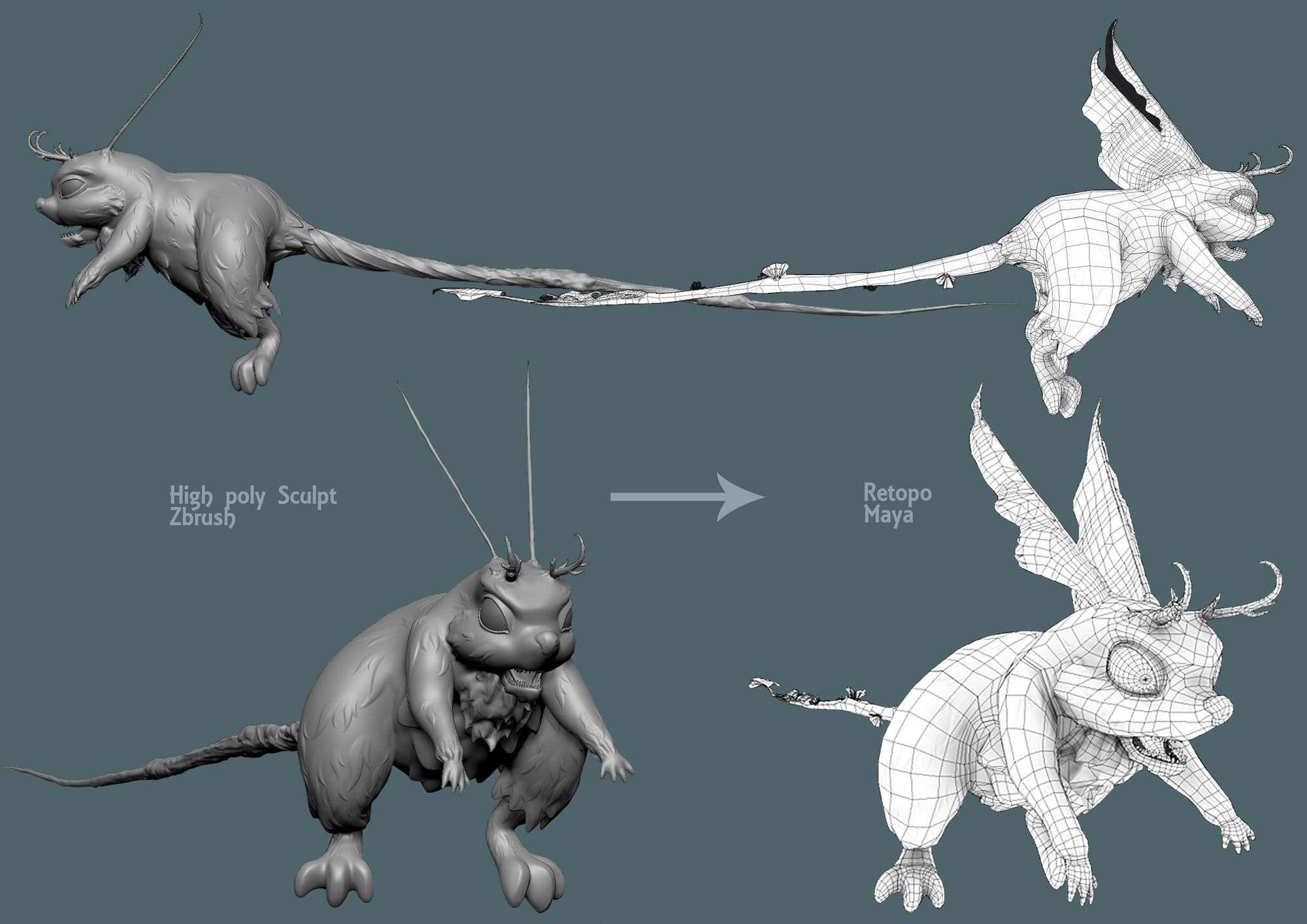
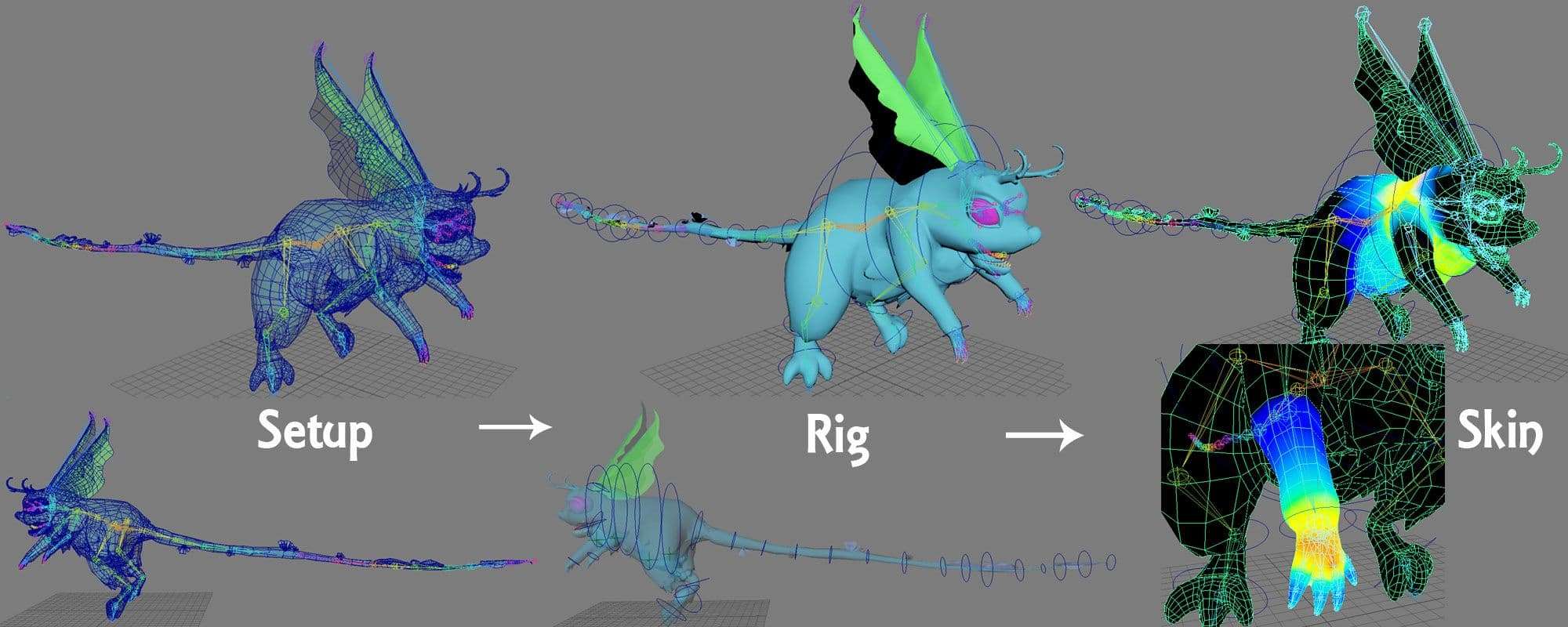
Once the retopo is made, it’s necessary to create the setup of the character (his skeleton), which will allow the character to move, as in reality. We follow the same principle by simplifying and adapting the skeleton at each morphology.

After this step I make the rig to create controllers that allow to move the body  more easily. I finish by skinning the character (paint the skin so that it follows smoothly the movements of the skeleton). Know the character is ready to be animate.
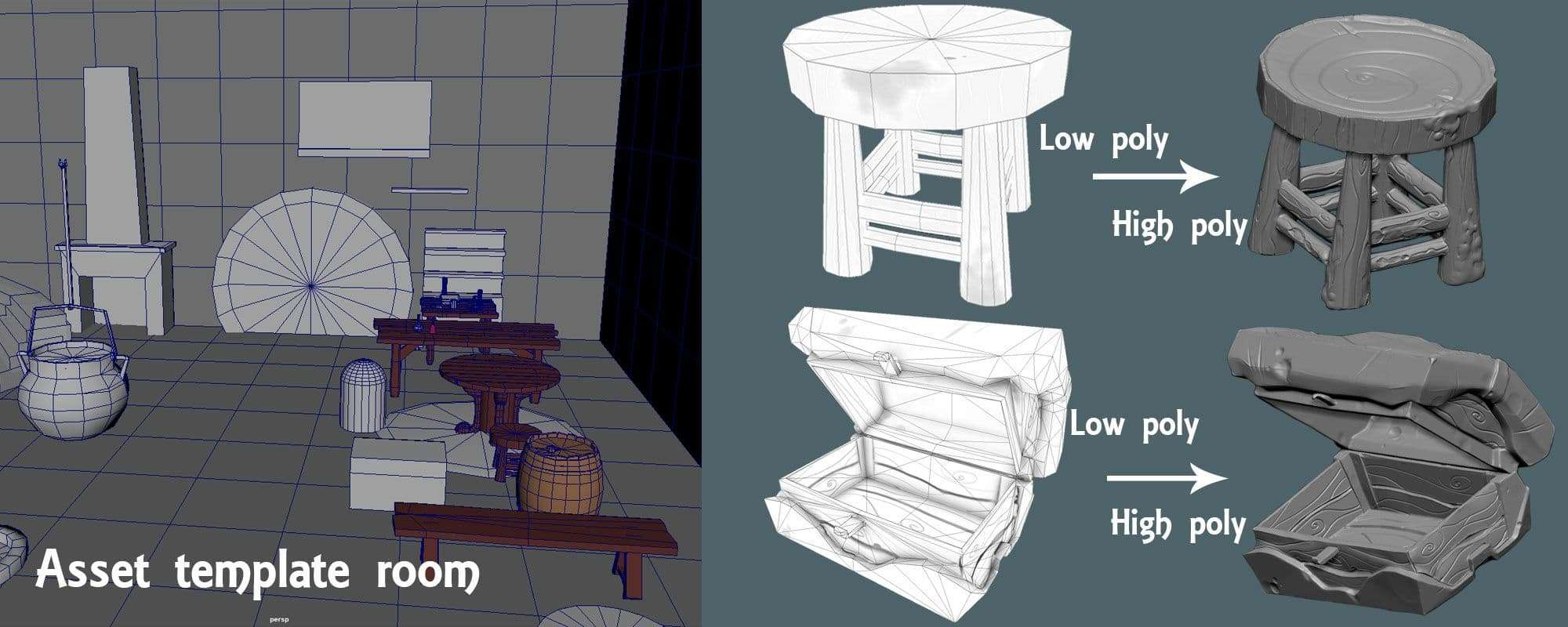
For the environment it’s necessary to know the dimensions of the room in which the person playing moves to manage the distance, and allow the player to move as much as possible by walking rather than teleporting. To solve this problem I create an asset template room, based on the dimensions given by the game designers.

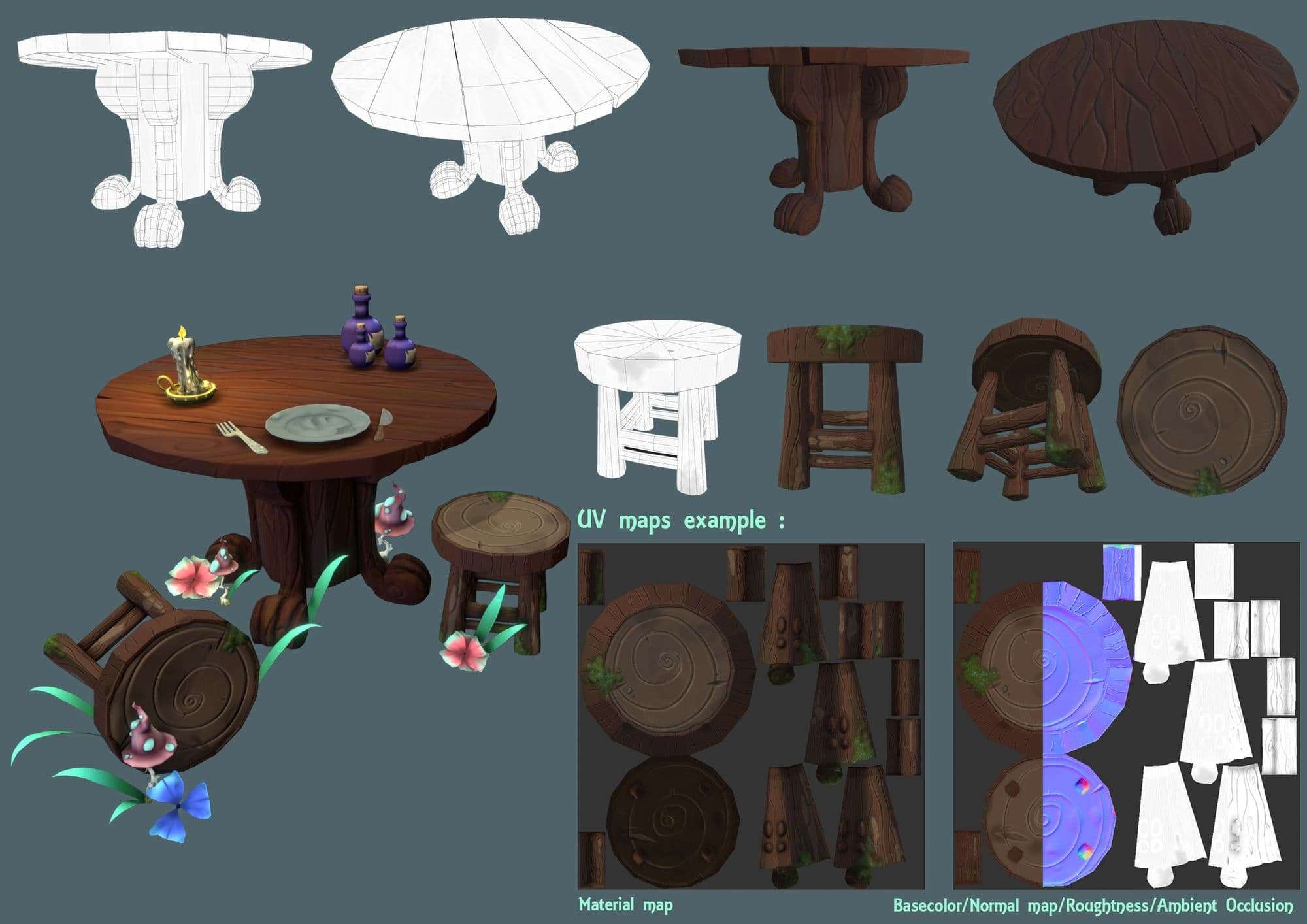
I integrate the elements like a table and chairs to be sure that the piece is at a realistic size compared to the player when he is on normal size. For all the environment, and props I first create a low poly asset in Maya.

Then I create a high poly asset on ZBrush with the low poly asset as a basis to add the details, and create a normal map for the textures.
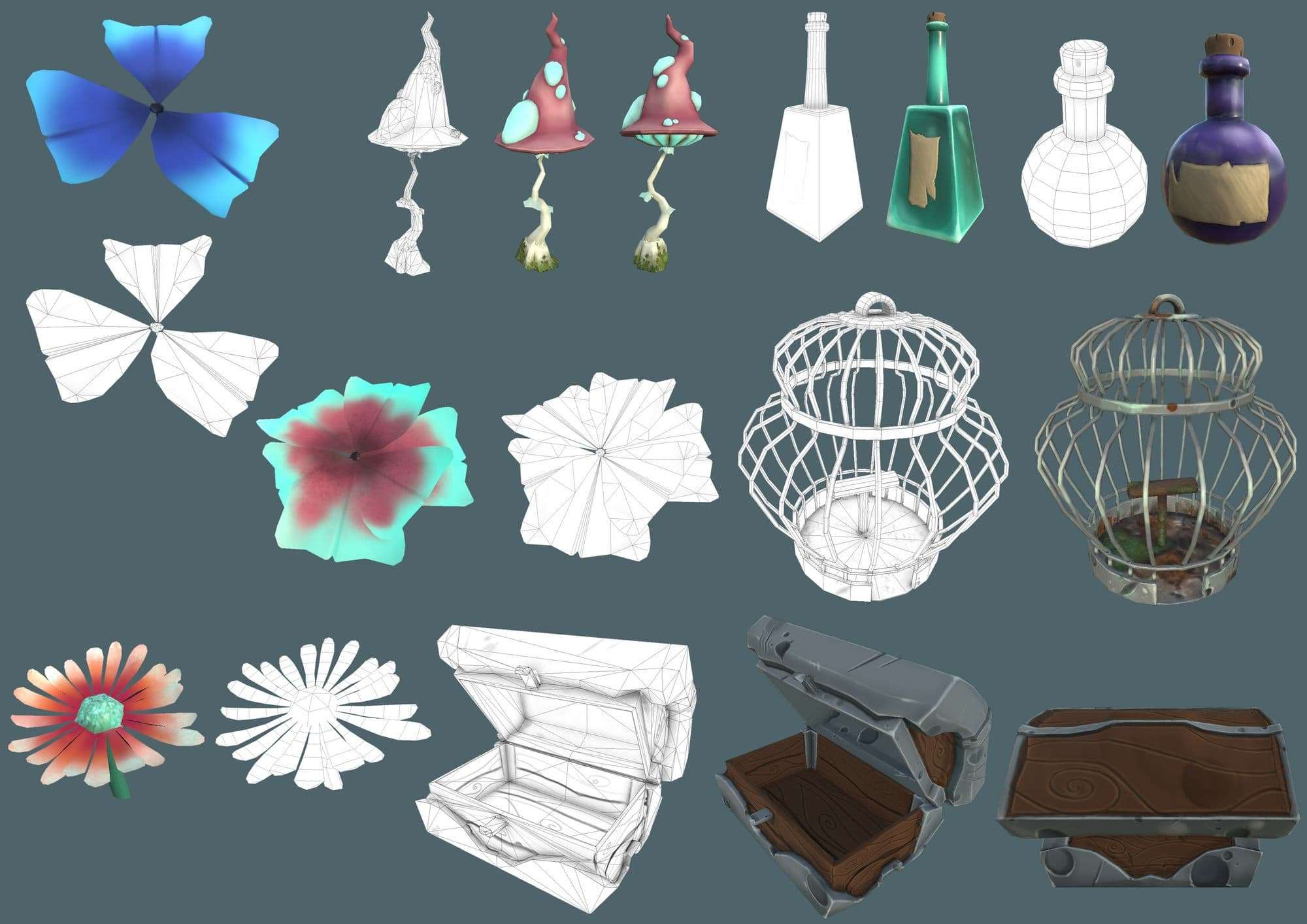
Unlike a game on console/PC, for VR the player can approach all the environment, take objects and inspect them from every angle. So we must create objects in their entirety and detail them (in the modelling to keep the volume and not having a flat feeling and with the normal map for more details). So you need more polygons than normal, but you have less leeway than for a console/PC game. We must balance aesthetics and technical problems.

I always start by creating the base of the decor and the objects necessary for the gameplay for a matter of time. if there is more time I can add elements, more and more small objects to add details and life to the environment. It‘s a very funny part because I can give free rein to my imagination.
Texture

First I unfold UVs, they should never pass on each other unless it’s the same part of the object and you want them to be in same colour.

For example if the object must be duplicated it’s better to create the UV before, it avoids repeating the same work 10 times, I put them with the same material and so there is only 1 texture to make in Substance Painter and she will be the same on all objects.

You can also create variants and change the material and output different maps that can create variations in Unity or Unreal.
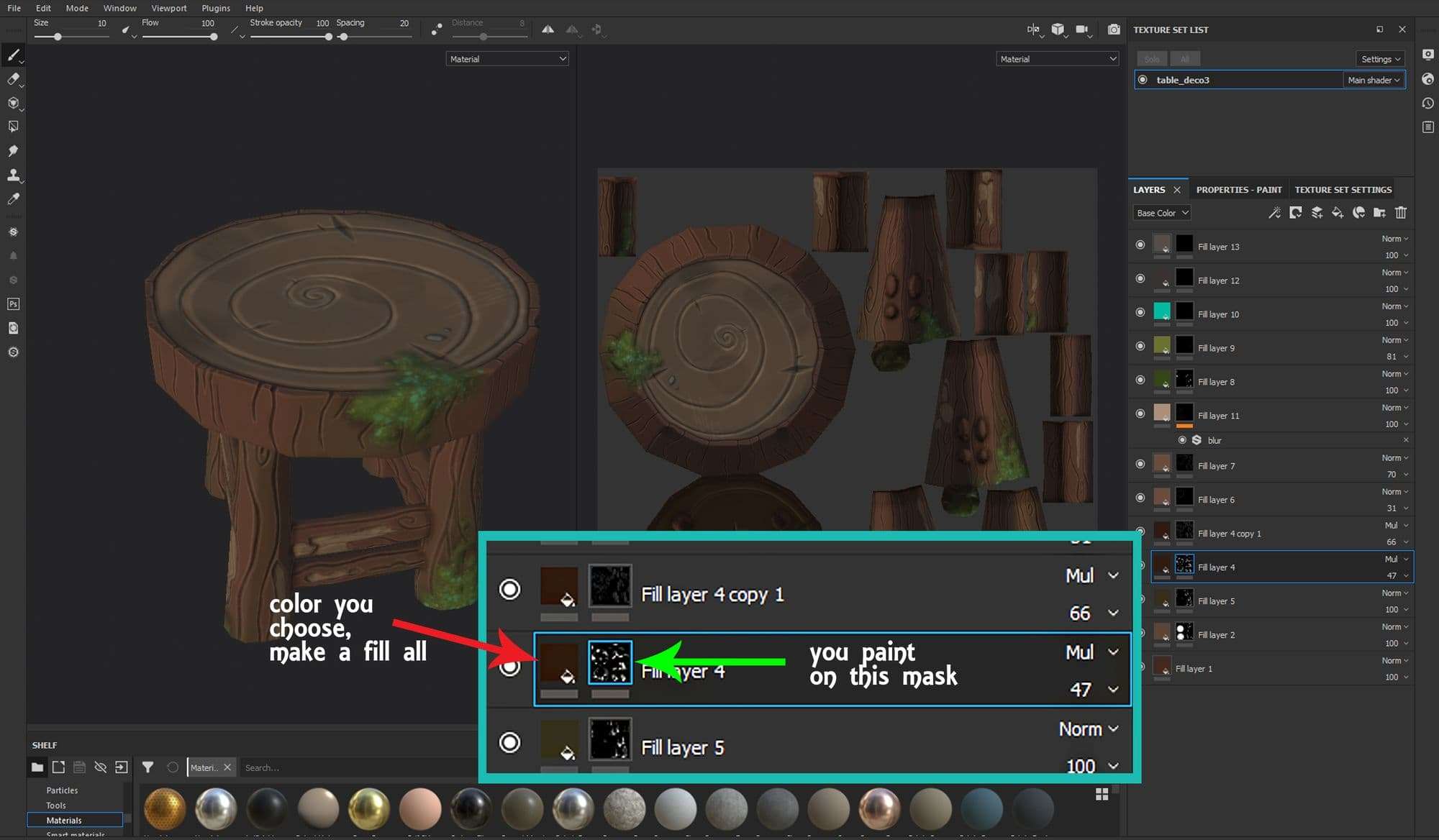
The textures are hand-painted but there are time-saving tips, especially to make texture variations on Substance Painter : I create a fill layer on which I choose the colour used, then I add a black mask and I paint the mask in white where I want to see the colour appear. It works for colours as the basis of each element but also for shadows, lights and patterns.

This technique makes it possible to test different colours and to be able to change them easily if you changes your mind without having to redo the painting. The maps generated by the High Poly asset make it easy to create realistic effects such details with the normal map and shadow with ambient occlusion.

For this project the graphic chart was cartoon with a painting effect, so I painted the shadows, lights and colour variations by hand. I still generated the Normal map and the Ambient Occlusion, for a better result.
Compositing and Lighting

The next step is to import 3D assets, textures and animations in Unreal Engine 4 or Unity, for this project we chose Unreal Engine 4.

To simplify the work of everyone I compose the scene from the export basic environment and we add with the game designers the gameplay objects and the aesthetic objects. Once the composition of the scene is done we duplicate it twice, so the game designer and the programmers could work quietly on a stage while I’m working on the lighting.

I tested the atmosphere in game with concepts arts, it’s used as a reference for the lighting of the 3D scene. To focus on the atmosphere of the hut I first uncheck the texture option of the scene, which allow me to focus only on lighting. From time to time I check the scene with texture to know what gives the lighting with, then I remove the textures to focus on the lighting.
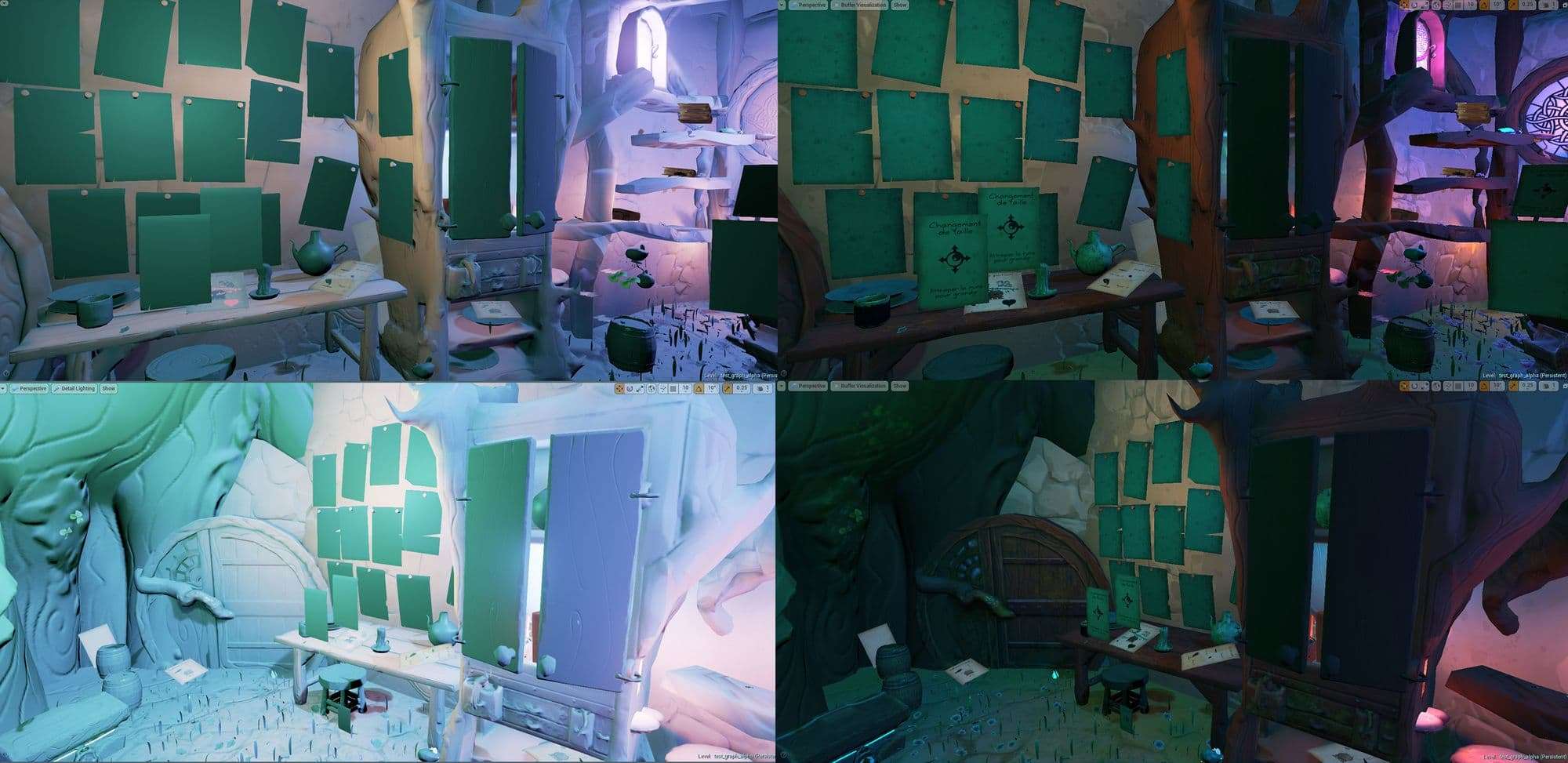
We chose a night scene, so I put a global light blue/purple, then I put big colored point lights, enough to define gameplay areas defined by the game designers and attract the player to these areas.
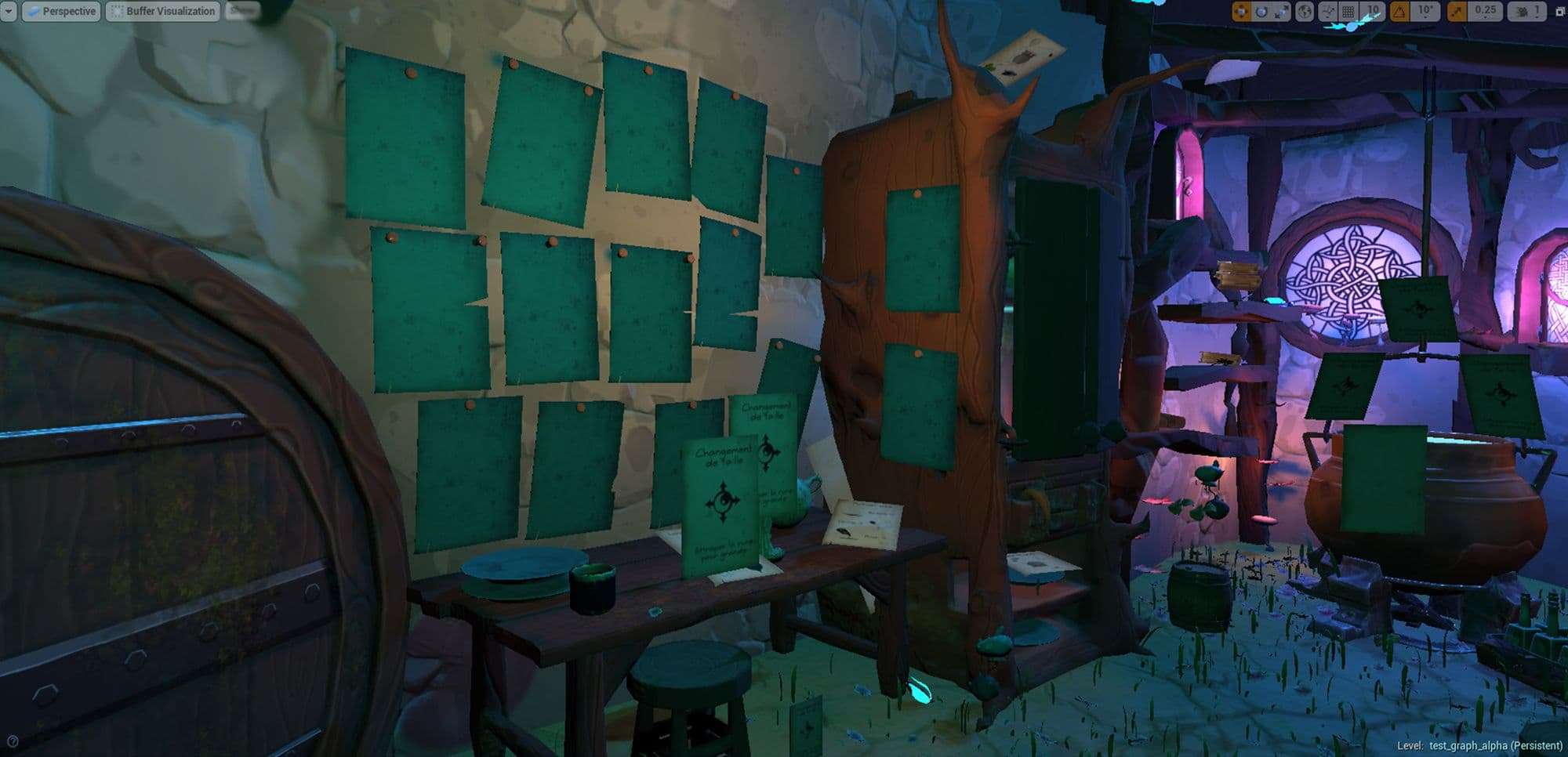
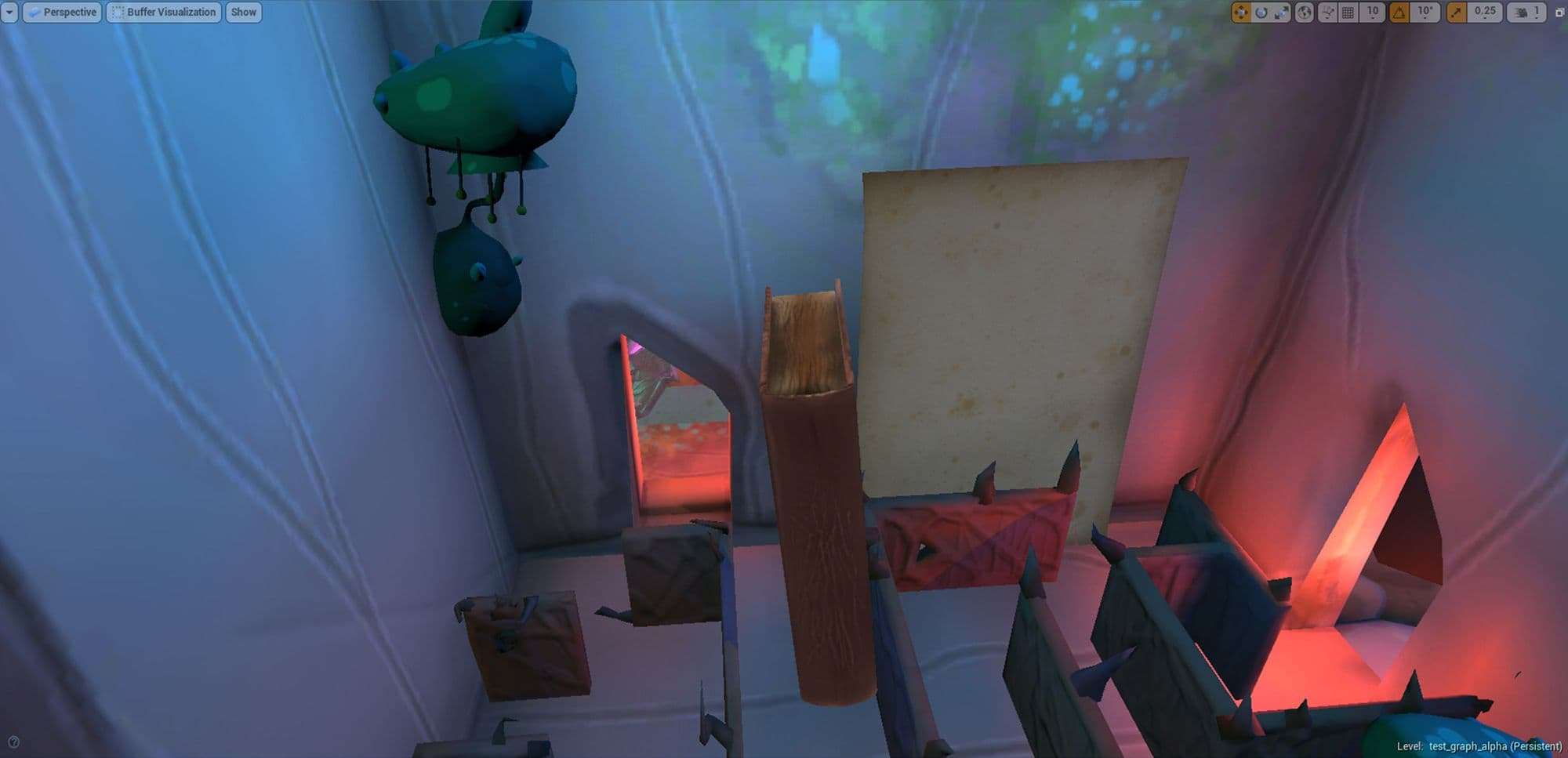
For example :  in the cupboard there is a labyrinth with a key hidden at the end. I put a warm light at the bottom of the cabinet intense enough for the player to notice it through the door between open, and be curious to become very small and access the labyrinth to find the key.
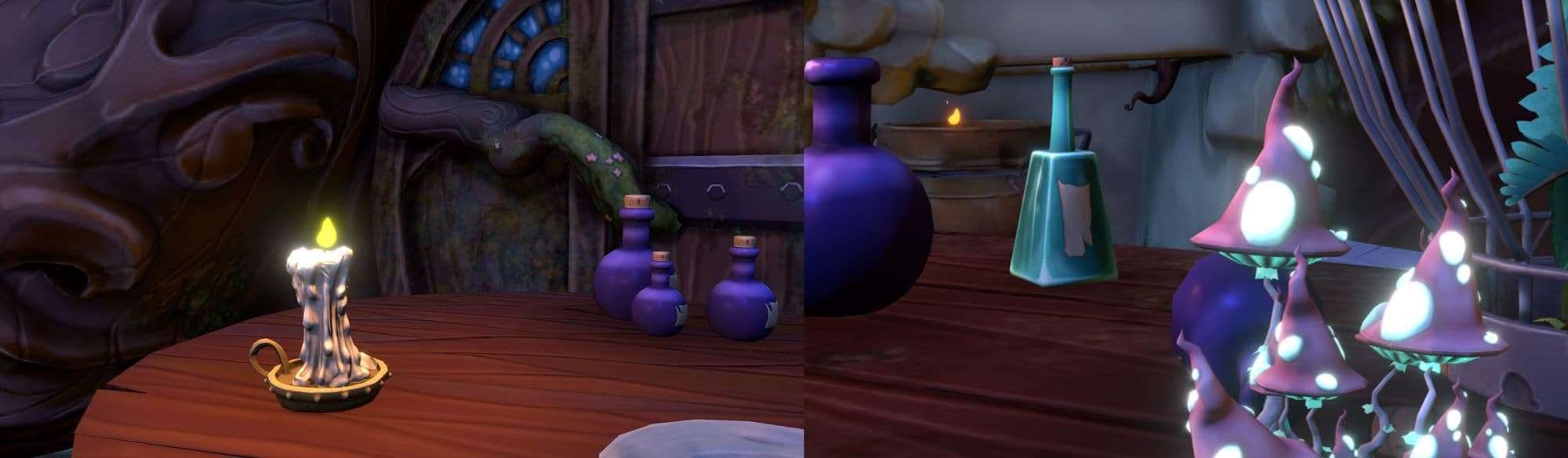
Once this basis is done, I add the small dot lights, especially candles, it gives life, and a more magical aspect to the scene. Some textures are also emissive, they shine but don’t emit light on the objects around them. To give them this effect I add point lights to give a luminous effect.
Once it’s done, I copy the lighting on the final stage, the one of the game designers.
When the lighting is finished,  we place the reflection box and we bake the lights in general to gain fluidity of the game.

The problem on this project is that many objects can move, especially when the player takes them. That’s 95% of the environment, so I only bake the everything that couldn’t move. A shadow can’t stay there in the void, it’s important when you bake the lights to always be sure which object can move or not to avoid creating an error.

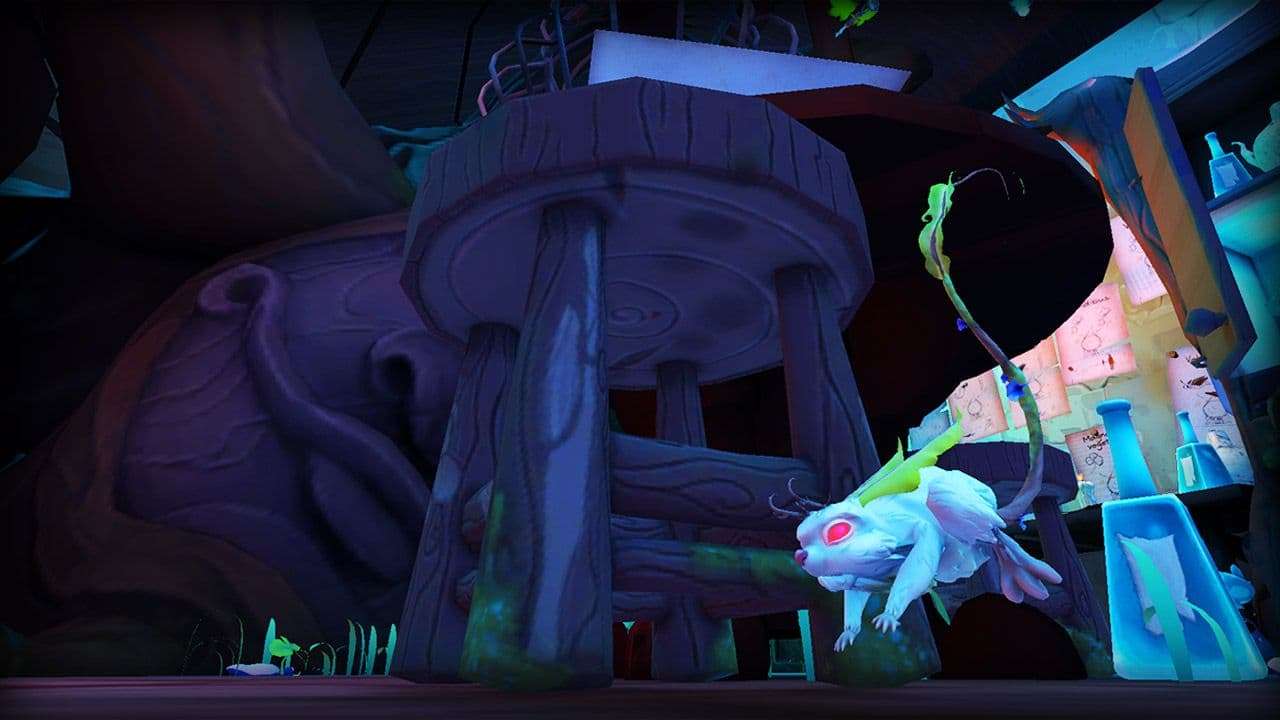
Here are some screen in game to show you the final rendering:
Marketing

Creating the graphics of the game is the most important part of the project, but never forget marketing is what will allow your game to be known and sell. This step is made at the same time of the lighting because the communication media must be ready at the same time as the game is finished. Some in game screens will appear in the communication so they will arrive at the end of the project.

I first create the logo, in 2D then in 3D to put it in the launcher of the game. I chose the shape of the cauldron because it’s the central element of the game. To recognize your game immediately, and that it’s impacting, you must know what represent your game, what is the element who will make you know which game you play immediately.
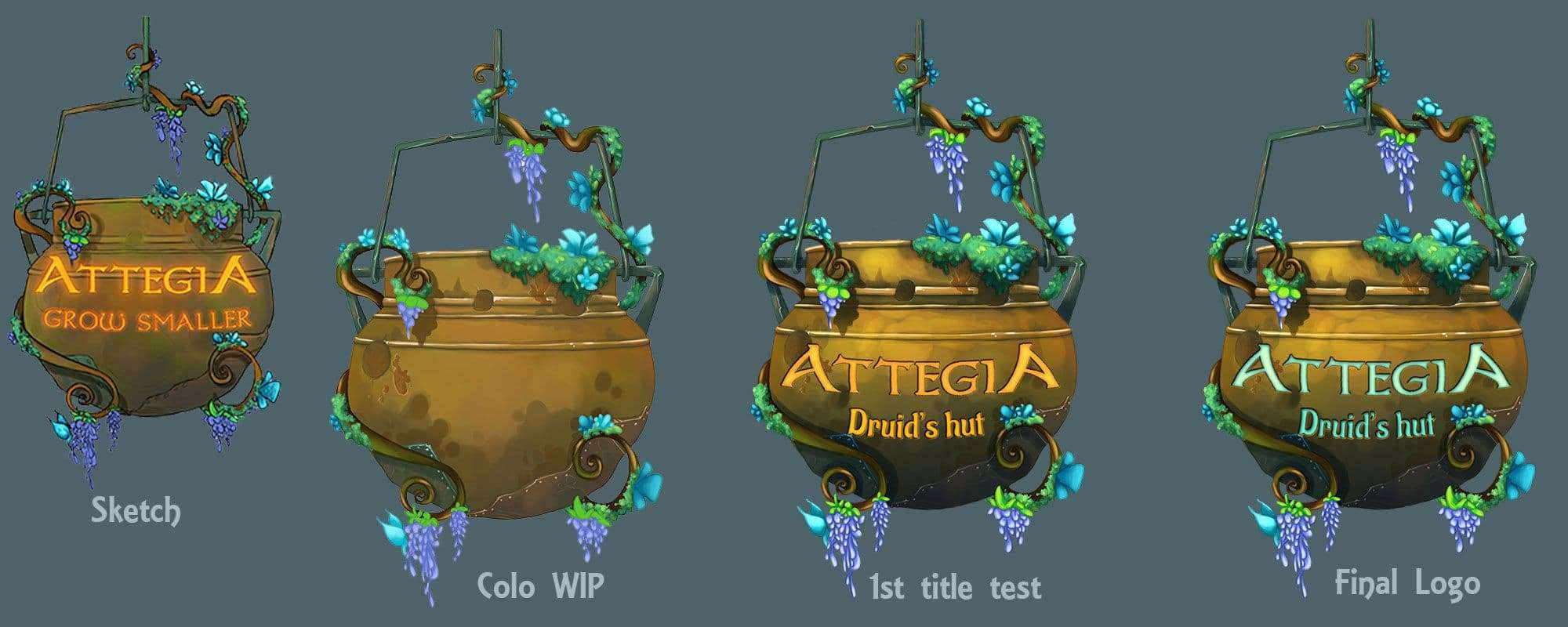
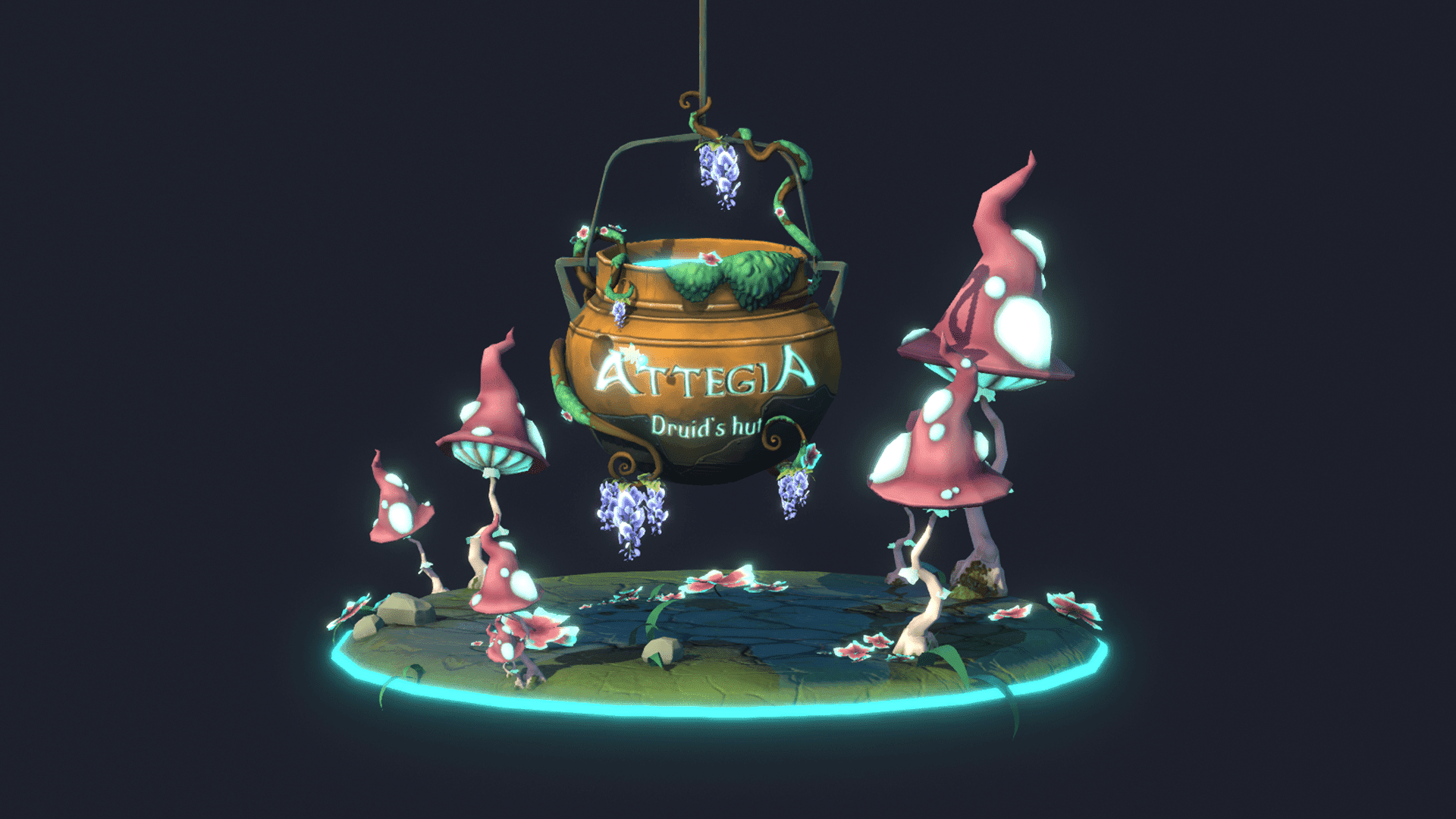
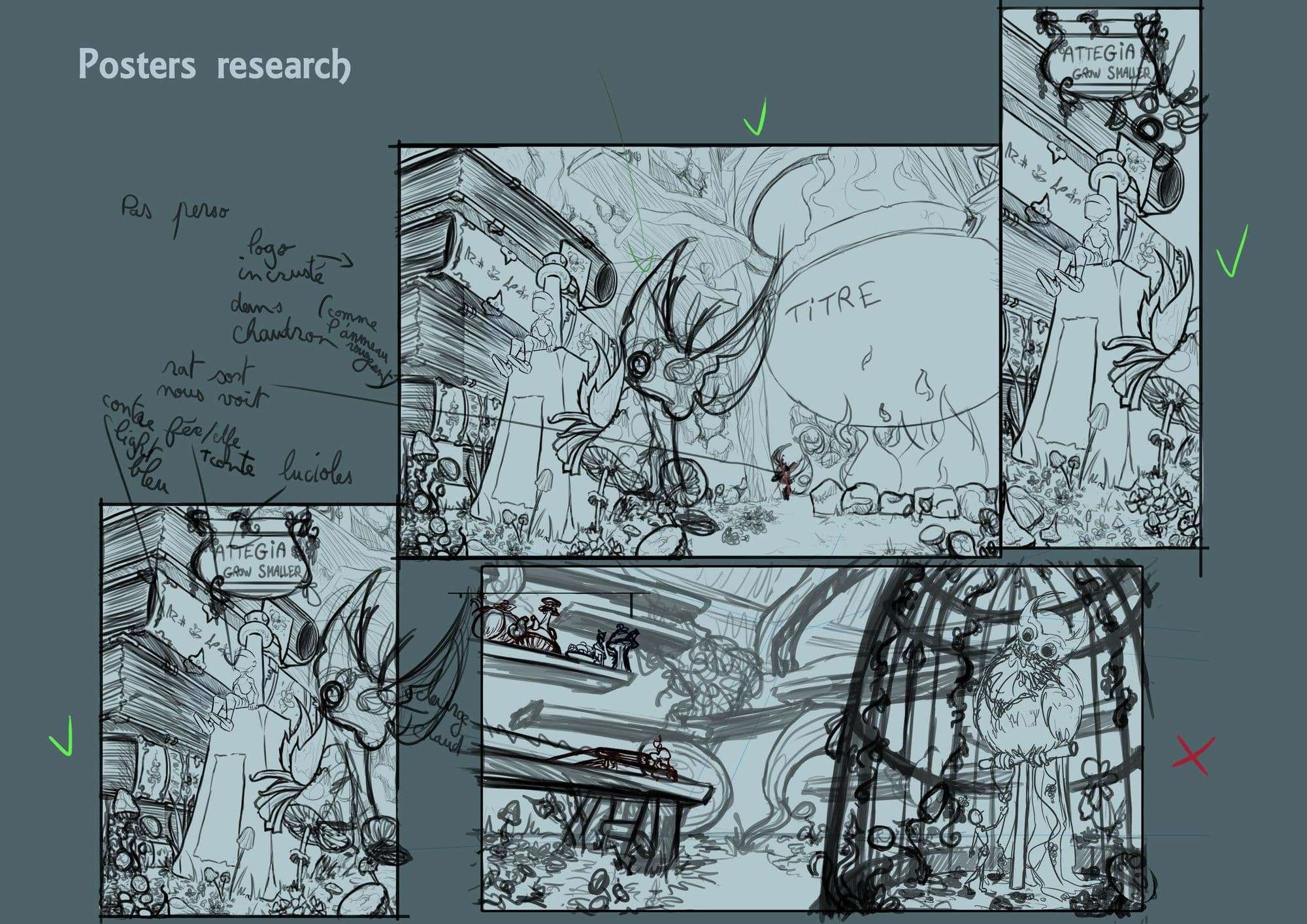
For research I often use either in game views or I create a scene with 3D models to test camera plans to save time and find quickly a view that suits me. This technique works whether I’m doing a 2D illustration or a poster that shows the retouched 3D.

To save time, and keep the posters coherent, I create the largest  landscape  poster  in Photoshop, in this poster I create the frame of the  portrait  poster, and the one of the roll-up (which I copy in another Photoshop file at the actual size of the roll-up).
Once the choice of the view is made, I create the illustrations. I start by making a line for the landscape and portrait poster, I also partially change some parts in the sketch of the roll-up to create a more impactful scene with the rat behind the books watching the player.
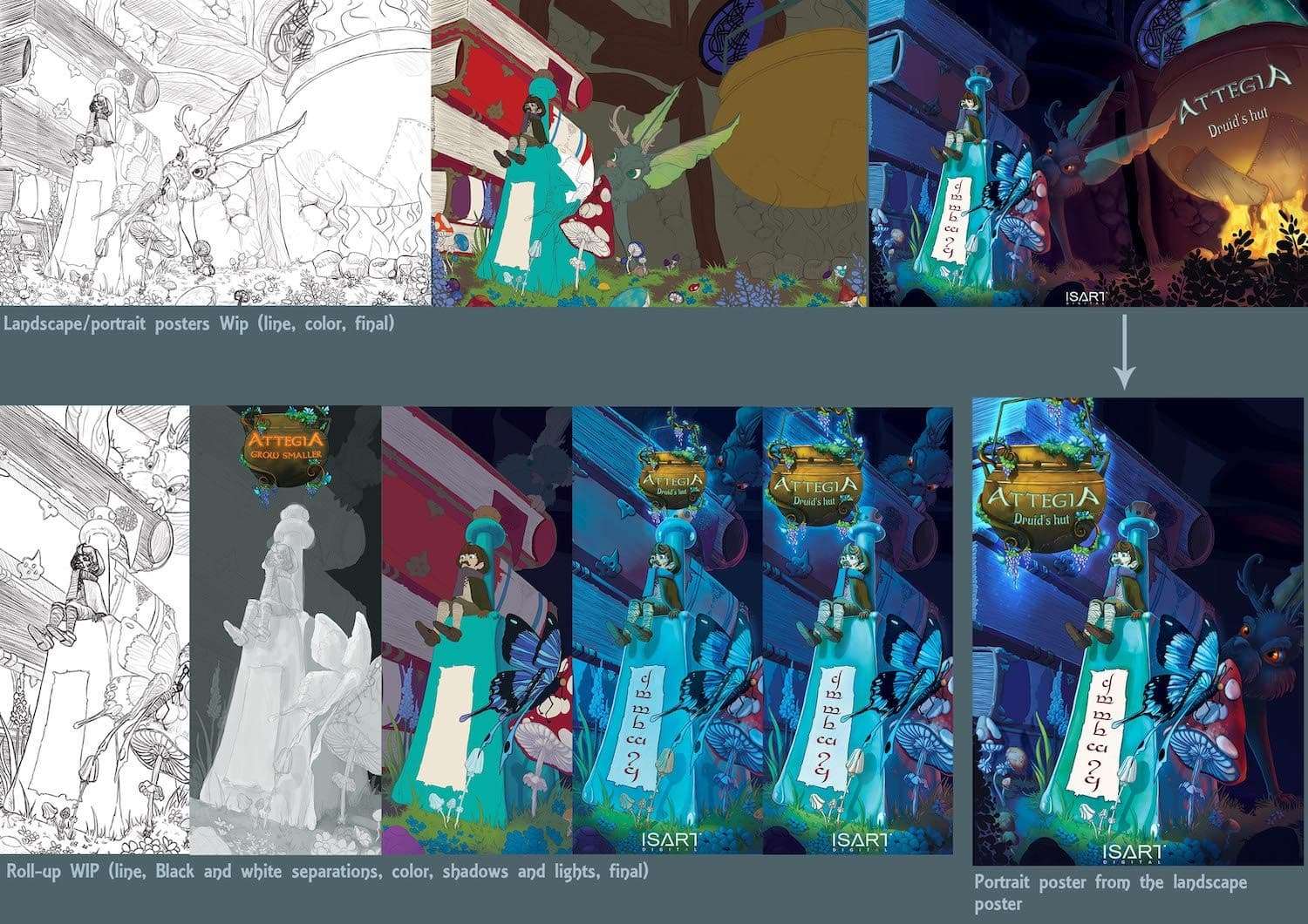
Once I finish the line I colorize the illustrations, laying the base of the colors, then the shades and the lights. Then I put the logo of the game on the posters. For the landscape poster as the cauldron is already present on the poster we have made the choice to embed the title only in this cauldron.
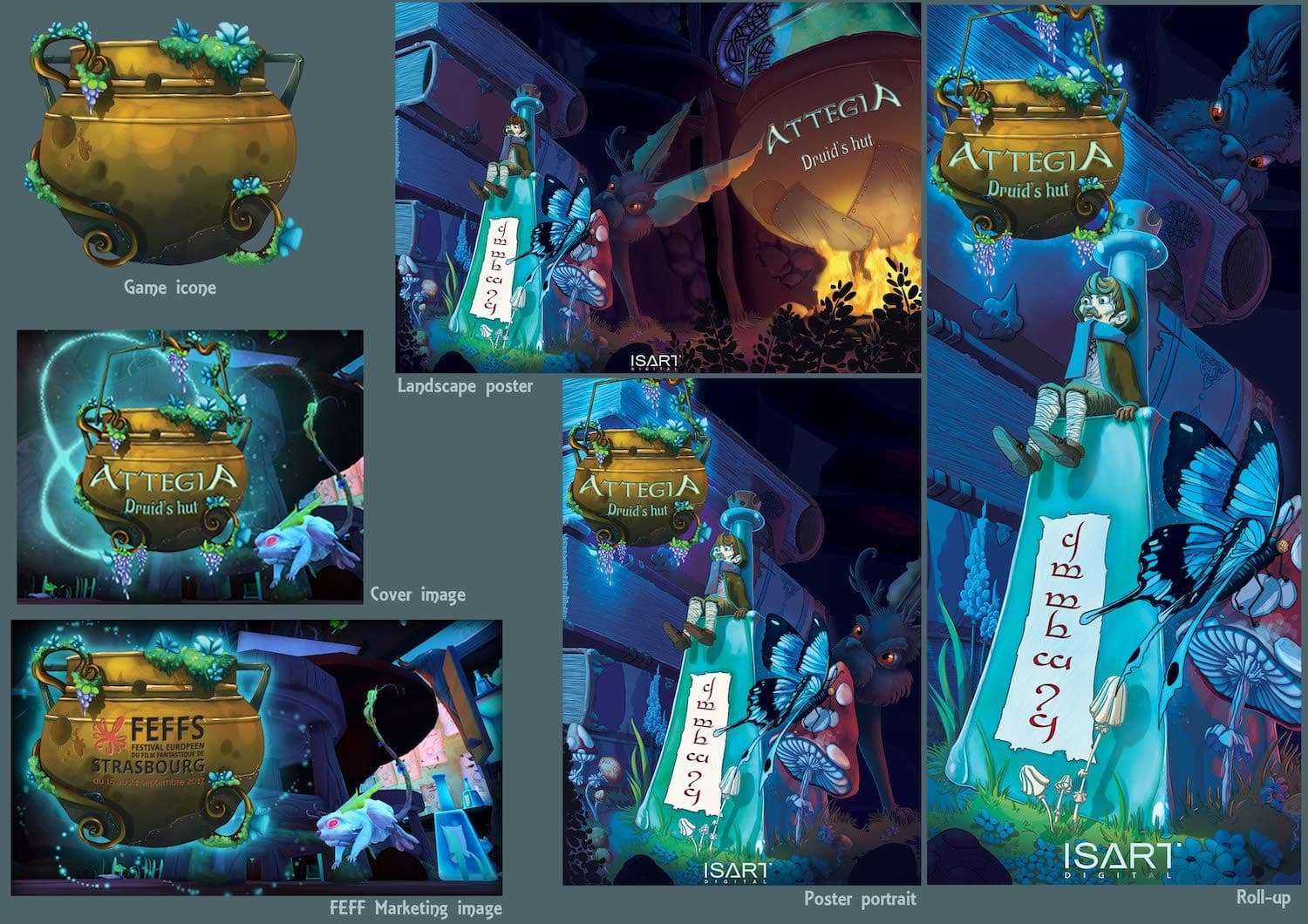
Conclusion: Here is a tip that I have to experiment with the creation of games: it’s always necessary to start from a global ambience to go step by step in the details, it is the base for each stage of the project, it’s the best method to keep a universe always coherent and not to scatter which is wasting time.

I hope my tutorial will help you. You want to create a game too? So find a good team and the most important thing is to have fun!
Animated video production services
Services

Types of Services:

Scroll to Top

Let's start!

Made once - used many times

This site is protected by reCAPTCHA and the Google Privacy Policy and Terms of Service apply.